


FireWire
3.856.00 Reviews
App Specs
- Version
- 9.8
- Updated On
- License
- Free
- Downloads
- 10,000+
- Developer
- NYC Fire Wire Inc
- Categories
- Maps & Navigation
- Platform
- Android
Screenshots

 Analysis by AppCompare
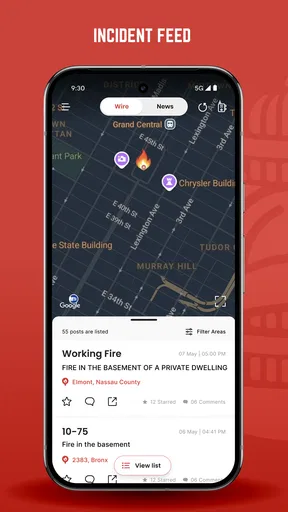
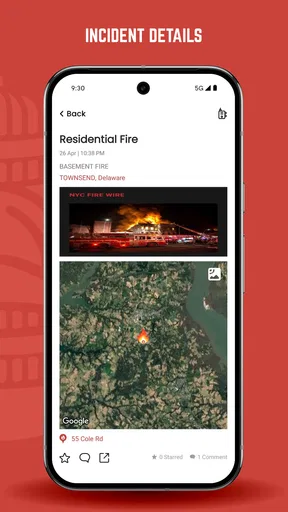
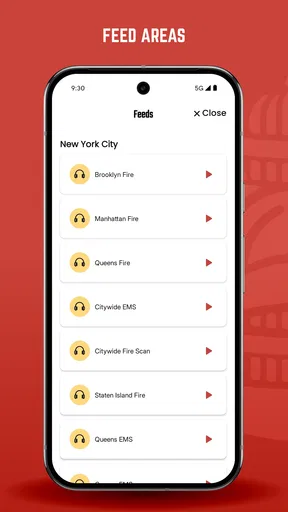
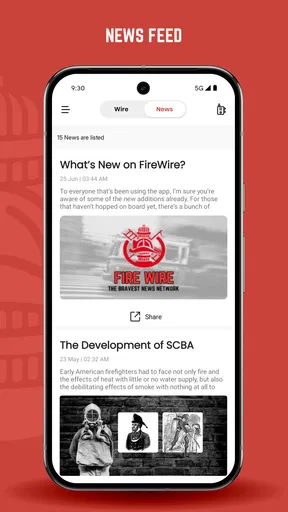
When a household shares a phone or tablet, a news app can become part of the everyday conversation: one person spots an incident, another checks the details, and everyone decides whether it affects a familiar route or neighborhood. That is the kind of practical role I would expect from FireWire. It is a free maps-and-navigation app from NYC Fire Wire Inc, focused on fire and emergency-service news and incidents rather than the broad, turn-by-turn guidance people usually get from a standard map app. I would treat it as a companion for staying informed, not as a replacement for emergency services or a dependable route planner.
A shared screen, with separate expectations
In a realistic household scenario, someone might open the app while making breakfast, notice a nearby incident, and mention it before another family member heads out. That can make a local update useful even when the person checking it is not the one traveling. The key is to share the information as a prompt to verify conditions, not as proof that a particular street is safe or blocked. An incident feed and live navigation solve different problems, and I would still use a conventional map for directions.
On a shared device, I would also make it clear whose account or app session is being used before anyone changes settings or makes an in-app purchase. I would not assume that a family profile, child-specific mode, or separate household controls exist. If more than one person needs regular access, each person should understand what is being shared and who is responsible for checking updates. That simple boundary avoids confusion about whether a notification or a saved preference belongs to one household member or everyone using the device.
Where coordination helps—and where it can mislead
FireWire is most useful in a household when one person takes on a modest coordination role: checking for relevant incident news, then passing along a concise, time-sensitive note. For example, if a caregiver is about to drive across town and another household member sees an emergency update that may affect the area, they can suggest checking a navigation app or official local guidance before setting off. This is more sensible than forwarding a dramatic headline without context or treating an app alert as an instruction to reroute.
A practical tip is to agree on what counts as worth sharing. A nearby incident may be interesting, but not every update requires a message to the whole family. That distinction matters in a busy household, where repeated alerts can create unnecessary worry. I would also avoid relying on a second person to monitor the app continuously: coordination works best as an occasional check, not as an informal emergency-dispatch system.
The audience matters too. The app is rated for Everyone, which makes its age classification broad, but that alone does not tell a parent how a particular child will react to emergency-related news. I would preview the content with younger users and explain that reports can describe frightening events. For a household that wants a child to use a device independently, I would first review the app together and decide whether the subject matter feels appropriate; I would not infer parental controls from the age rating.
For adults who follow local emergency activity, the focus may be a good fit. For someone who only wants the shortest route to work, it may be the wrong tool to open first. The useful question is not whether every household member should install it, but whether anyone in the home has a genuine reason to keep up with this kind of news and can interpret it calmly.
Worth Reading Before You Choose

Flipboard Shows What News Apps Must Do Beyond the Feed

Switching to Android Auto Means Rethinking Your Driving Routine

Google Calendar Makes a Crowded Week Easier to Manage

Ludo King Makes the Most of the Minutes Between Plans

Baby Panda World Brings Quick Play to Modern Phones, but Its Game Library Feels Busy

ESPN’s Live Game View Makes Following Close Games Easier
What to expect before making it part of the routine
FireWire has an average rating of 3.8 from 126 ratings, with 55 written reviews, and more than 10K installs. I read those figures as signs of a modestly established app, not a guarantee that it will suit every device or neighborhood. It is free to download, though in-app purchases range from $1.00 to $5.99 per item. On a shared device, I would check purchase prompts before handing it to someone else, especially a child, and make sure everyone understands that free access does not necessarily mean every optional item is free.
The app was released on September 12, 2019, and its current version is 9.8. It requires Android 7.0 or later. Those details are useful when deciding whether an older household device can run it, but they do not answer how well it performs on that particular device. I would install it on the phone or tablet most likely to be used for local checks, then see whether its updates are clear and relevant before making it part of a family routine.
Compared with a general map app, FireWire has a narrower purpose: it is centered on fire and emergency-service news, while conventional navigation apps are the better choice for routes and ordinary travel planning. Compared with simply following local news, a dedicated app may make incident information easier to consult in one place, but it still deserves the same caution as any fast-moving report. I would use the most appropriate source for the question at hand rather than expecting one app to handle news, navigation, and emergency response equally well.
My main practical advice is to test the app in a calm moment, not for the first time when a family member is already worried about an incident. Open it together, work out what sort of information is useful to your household, and decide how you will verify anything that could affect a trip. If alerts or updates feel distracting, keep the app as an occasional check rather than a constant background presence. That approach preserves its potential value without letting emergency news dominate a shared device.
Okay, so I stumbled upon this app called FireWire, and let me tell you, it's like finding a hidden gem in a sea of apps. If you're someone who's always on the lookout for cool new ways to connect with people or just spice up your daily routine, this might just be what you need.
First Impressions and Getting Started
When I first opened FireWire, the sleek design immediately caught my eye. The interface is super user-friendly, so you don't have to be a tech wizard to navigate it. Setting up an account was a breeze too. Just a few taps, and I was ready to dive in. The app does a great job of holding your hand through the initial setup without being overly intrusive.
Features That Light Up Your Day
Now, let's talk about what makes FireWire stand out. The app is packed with features that are both practical and fun. For starters, the personalized feed is one of my favorites. It’s like having a daily dose of curated content tailored just for you. From news updates to trending memes, it’s all there.
Another feature that I found super handy is the community groups. Whether you're into cooking, gaming, or even knitting, there’s a group for you. Joining a group is as easy as pie, and it’s a great way to meet new people with similar interests. Plus, the interaction within these groups is vibrant and engaging.
Now, for those who love to share every moment, the app’s story feature is a hit. You can post pictures or videos, add quirky stickers, and even throw in a bit of music to spice things up. It’s all about expressing yourself, and the app makes sure you can do that effortlessly.
Staying Secure and Connected
In a world where privacy is a big concern, FireWire doesn’t disappoint. The app takes security seriously, with features like two-factor authentication and end-to-end encryption. It’s comforting to know that your data is safe and sound.
Connecting with friends is also a seamless experience. You can sync your contacts and see who’s already on the app, or send invites to those who aren’t. The messaging feature is pretty robust, allowing for text, voice, and even video calls. It’s like having all your favorite communication tools rolled into one.
Keeping It Fresh and Fun
One thing I truly appreciate about FireWire is how they keep things fresh with regular updates. The developers seem to be on the ball, constantly adding new features or tweaking existing ones based on user feedback. It’s nice to feel like your voice actually matters.
The app also hosts regular challenges and events, which are a fun way to engage with the community. Whether it’s a photo contest or a trivia night, there’s always something happening. It’s these little touches that make the app feel alive and buzzing.
What Could Be Improved?
Of course, no app is perfect. While FireWire offers a lot, there are a few areas that could use a bit of polish. Sometimes the notifications can be a bit overwhelming, especially if you're part of multiple groups. A more refined notification management system would be a welcome addition.
Additionally, while the app is generally smooth, there are occasional hiccups, like minor lags or crashes. They’re not deal-breakers, but a bit of optimization wouldn’t hurt.
Final Thoughts
All in all, FireWire is a fantastic app that brings a lot to the table. It’s engaging, feature-packed, and makes connecting with others fun and easy. Whether you’re looking to expand your social circle or just want an app that keeps you entertained, it’s worth giving FireWire a shot.
If you’re curious to try it out, you can find the download links on our website. Just click, install, and see for yourself. Trust me, you won’t regret it!
Pros
- Intuitive user interface for easy navigation.
- Fast file transfer speeds between devices.
- Supports multiple file formats seamlessly.
- Secure encryption for data protection.
- Cross-platform compatibility enhances usability.
Cons
- Occasional connectivity issues reported.
- Lacks advanced customization options.
- High battery consumption during transfers.
- Requires internet for initial setup.
- Limited support for older OS versions.
FAQs for FireWire
What is FireWire and what does it offer?
FireWire is an innovative app designed to streamline the sharing of large files between devices quickly and securely. With its user-friendly interface and robust performance, it supports a variety of file types and ensures transfers without loss of quality. It's ideal for both personal and professional use, making it a versatile tool for efficient file management.
Is FireWire compatible with all devices?
FireWire is compatible with both Android and iOS platforms, ensuring seamless functionality across most smartphones and tablets. It's important to check the app's requirements in the app store to ensure your device is supported. Regular updates also expand compatibility, enhancing user experience across a broader range of devices.
How secure is the data transfer using FireWire?
FireWire prioritizes security by utilizing encryption protocols to safeguard your data during transfers. This means that whether you're sharing personal photos or critical business documents, your data is protected from unauthorized access. Additionally, the app does not store your files on any servers, ensuring privacy and security.
Are there any limitations on the file size or type when using FireWire?
FireWire supports a wide range of file types, including documents, videos, and images, without imposing strict size limitations. However, for optimal performance, it is recommended to ensure your device has sufficient storage and processing capability to handle large files effectively, especially when transferring multiple files at once.
Is FireWire free to use, or does it have a premium version?
FireWire offers a free version with essential features that cater to casual users. For those needing advanced functionalities, such as higher transfer speeds and priority customer support, a premium version is available. This paid version includes additional features that enhance the overall user experience and performance of the app.


